

The Call Sheet System
15,000+ Filmmakers Trust in Production
G-Casper is a free call sheet system built on Google Sheets by Prodigium Pictures. It handles the parts of your day that eat time: auto-filling cast and scene information, tracking food restrictions, calculating sunrise and sunset, flagging call time errors before they become problems on set. More than 15,000 filmmakers in 110+ countries have used it.
Free. No account required. Hosted on Google Drive.
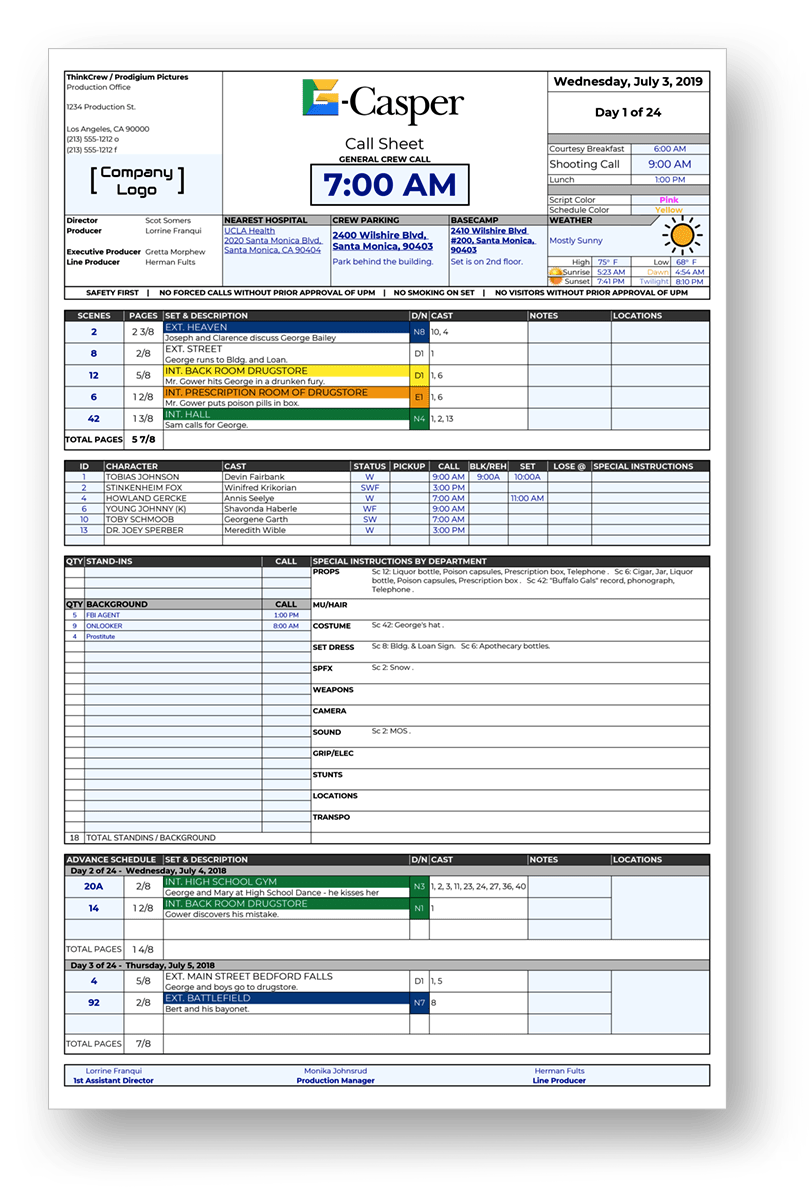
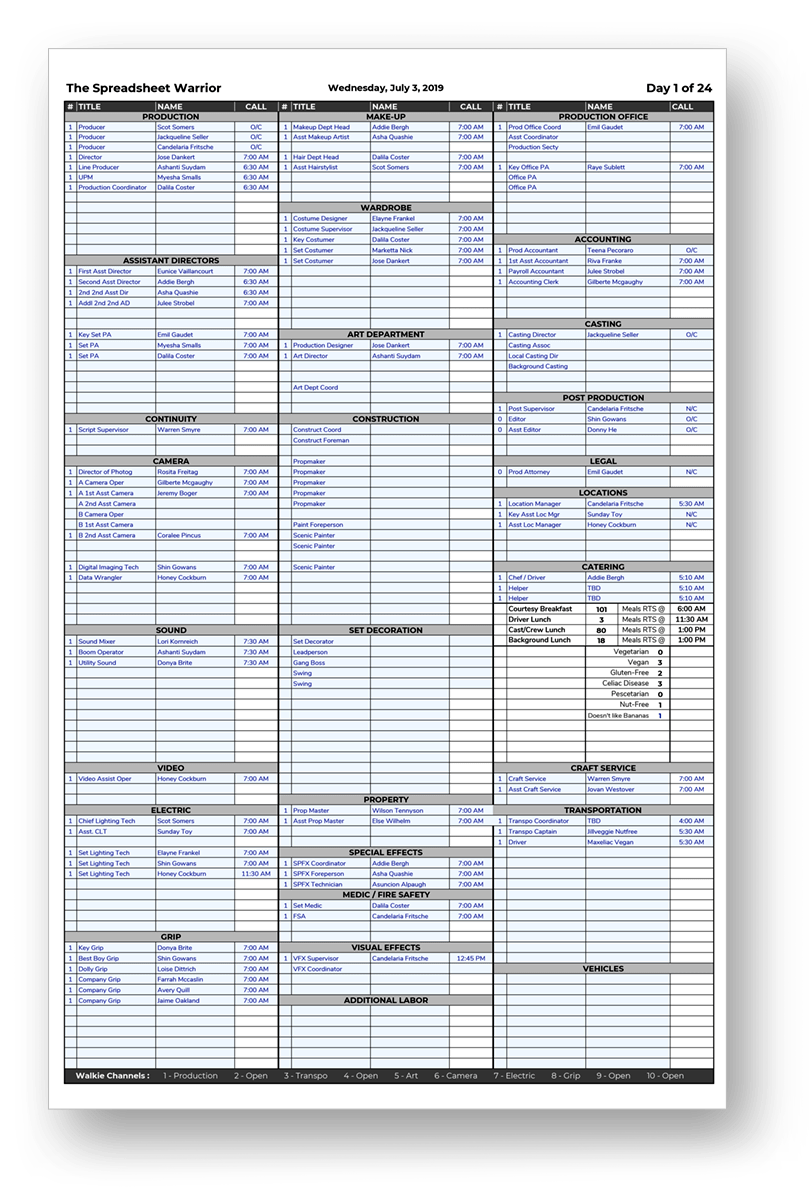
G-Casper in Google Sheets. Call sheet front (left) and back (right).
What is G-Casper?
G-Casper is not a blank form. It is a full call sheet system built inside Google Sheets by the team at Prodigium Pictures. They have been refining it through 10 years of real productions. The workbook includes the call sheet front and back, the crew list, an advance schedule, a daily weather section, a SAG Exhibit G form, and a production report sheet. All in one file.
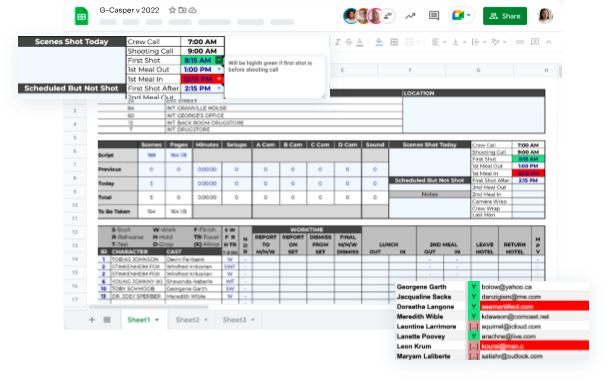
More than 30 automations are built in. Scene information auto-fills across sheets. If you call an actor who is not in a scene, G-Casper flags it. If a scene number does not match your breakdown, it flags that too. Call time errors get caught before they cost you on set.
G-Casper lives in your Google Drive. Your whole production office can work in the same file at the same time. Share a link. No attachments. No version confusion.
What G-Casper includes
Here is what the sheet does on its own once your show is in it.
30+ automations built in
Enter your production details once. G-Casper carries them through every sheet. Scene info, cast, sunrise and sunset, call time errors, food restrictions for catering. The data you enter in one place appears everywhere it belongs.
Call sheet front and back
The front has your shooting schedule, cast calls, weather strip, location block, and special instructions. The back has every department, position, name, and number. Both pages auto-populate from your data sheets.
Weather built in
A weather strip is built into the call sheet front. G-Casper includes scripts to fetch the daily forecast for your shooting location. You run the script, it drops the weather in. No copy-pasting from a browser tab.
SAG Exhibit G template
The Exhibit G form is built into the workbook. You fill it in from your background performer data. No blank document to build from scratch.
Movie Magic import
G-Casper supports importing from Movie Magic Scheduling. It is a manual process that typically takes one to two hours to map and apply your schedule data.
Production report output
A production report sheet is included in the workbook. The structure is already set up. You record what happened during the day. The formatting and layout are done.
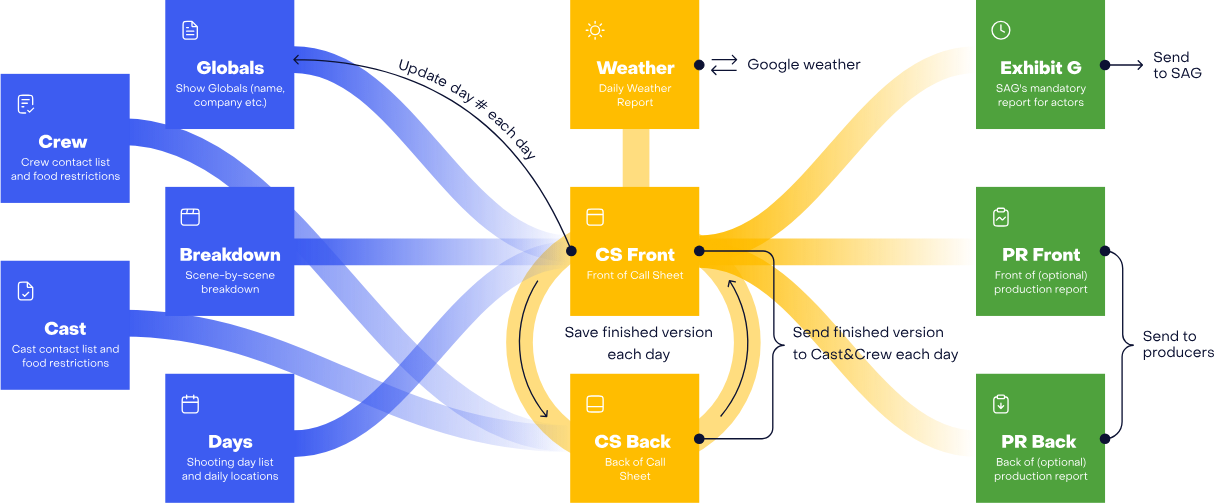
How G-Casper connects your data across sheets. Enter it once, it populates everywhere.
Your whole production office works in the same file
G-Casper lives in Google Drive. The 1st AD, 2nd AD, UPM, and production coordinator can all be in the same file at the same time. When the coordinator updates the crew list, the call sheet reflects it. When you adjust call times, everyone sees it. Share a link. No emailed attachments, no stale versions.
Want crew to get updates pushed directly to their phones? G-Casper Pro adds SMS distribution.
What a professional call sheet contains
Every section has a purpose. Here is what each one covers and why it matters.
Production header
The top of the call sheet identifies the production. It includes the title, episode or project number, shoot date, shoot day number, and the general crew call time. This is the first thing every crew member reads.
Key production contacts
This section lists the director, 1st AD, 2nd AD, UPM or line producer, DP, production designer, and locations manager. Each person's name and phone number appears here so anyone can reach who they need without asking.
Shooting schedule
The heart of the call sheet. Each scene is listed with its scene number, INT or EXT designation, day or night, scene description, location, cast numbers, page count, and any notes. Company moves and lunch breaks appear as banner rows between scenes.
Cast call list
Every speaking cast member gets a row with their name, character, makeup and hair call time, on-set call, and the scenes they appear in. The 2nd AD fills this in and cross-checks it against the shooting schedule.
Background performers
Background categories (looks, quantities, report times) are listed separately. Each group has a holding location and notes for the background coordinator. This section can be minimal on days without background work.
Weather forecast
A strip showing the forecast at your shooting location across morning, midday, afternoon, and evening. This helps departments plan wardrobe, lighting, and safety accordingly. Outdoor productions need this front and center.
Shooting location and parking
The full address of the primary shooting location, parking instructions, and the nearest hospital address. The nearest hospital is required on every professional call sheet. Crew arriving to a new location depend on this.
Special instructions
Any notices that apply to the entire crew go here: safety notes, costume requirements, parking restrictions, COVID protocols, NDAs for sensitive material, or anything the 1st AD needs the whole crew to read before call.
Advance schedule
A compact look at the next few shoot days. Scene sluglines and locations for the coming days let crew plan travel, wardrobe prep, and logistics. This section reduces the number of questions the AD gets about what's coming.
How to get started with G-Casper
Go to the G-Casper page on Prodigium Pictures
Visit the Prodigium Pictures page and click the link to access the G-Casper template. It opens directly in Google Sheets.
Make a copy to your Google Drive
In Google Sheets, go to File and select "Make a copy." Give it a name and save it to a folder in your Google Drive. That copy is now yours.
Fill in your production details
Start with the Globals sheet: production title, key contacts, and shoot dates. G-Casper carries that information across every sheet automatically. Then build out your crew list and scene breakdown.
Share via Google Drive link
Click Share in the top right of Google Sheets. Set the access level and send the link to your production team. Everyone works in the same file. No attachments, no version confusion.
G-Casper vs. G-Casper Pro
G-Casper is free and covers most productions. G-Casper Pro is what you reach for when the production needs SMS distribution, DOOD tracking, and a system not limited by spreadsheet software.
| Feature | G-Casper (Free Google Sheet) |  G-Casper Pro G-Casper Pro |
|---|---|---|
| Distribute to crew | Share the Google Drive link with your team | SMS to every crew member with their personalized call time |
| Weather data | Daily forecast only, via built-in scripts you run manually | Granular hourly forecast, fetched automatically for your exact shooting location |
| Cast call times | Calculated with spreadsheet formulas | Auto-drafted from general crew call with SAG rules applied |
| Edit after sending | Everyone sees edits live in the shared Google Sheet | Push revisions via SMS; crew view updates in real time |
| Crew list | Stored in the sheet, copied between productions by hand | Persists across all your productions automatically |
| DOOD tracking | No Crew DOOD. Basic scene schedule in the workbook | Full Crew DOOD generated automatically from your shooting schedule |
| Background performers | Basic tracking with limited fields | Full background management with bulk editing and detailed breakdowns |
| Scheduling import | Movie Magic import supported; takes 1 to 2 hours of manual work | Movie Magic and USS import in about 30 seconds, fully automated |
G-Casper covers the basics and then some. See what Pro adds.
When the production outgrows a spreadsheet
G-Casper Pro is custom-built for production, not adapted from a general-purpose tool. It auto-drafts call times, pulls live weather, sends SMS to every crew member, and tracks DOOD across the whole schedule. G-Casper gets you started. Pro keeps you running.
Already have access? Sign in to G-Casper Pro